Inputlog
Inputlog is a tool to observe writing processes unobtrusively. Writing researchers and teachers use keystroke logging to describe and analyze online writing or translation processes. Visit the inputlog website here for more information from the developers.
You can download the current inputlog version from their website or also an earlier version 7 from here (Password for installation: IL7558).
While inputlog is designed to work in conjunction with MS Word, it also logs keystrokes outside Word. However, in that case it only logs the keystrokes but cannot know the context in which these keystrokes/mouseclicks are produced. Inputlog can be used in conjunction with Translog-II. While Translog-II can only record keystrokes that are produced inside the Translog-II editor, inputlog captures all keystrokes that are produced inside and outside Translog-II. Both log files can be merged and synchronized based on the keystrokes that occur in both logging tools. The result is a more complete picture of keyboard activities inside and outside Translog-II.
Workflow Procedure
- Start inputlog
- Start Translog-II
- Run the translation session
- Stop Translog and save the Translog-II
*.xmlfile - Stop inputlog: an
*.idfxfile will be automatically produced in the Inputlog folder - Merge the Inputlog
*.idfxfile into the Translog-II*.xmlfile (see below) - Upload the merged output to the TPR-DB
Important Considerations
In order to run inputlog with Translog-II, you have to change the recording settings (as Word is the default writing environment for inputlog). Be aware that changing this option will limit the use of certain analysis possibilities that inputlog provides (e.g., revision analysis, process graph, etc.).
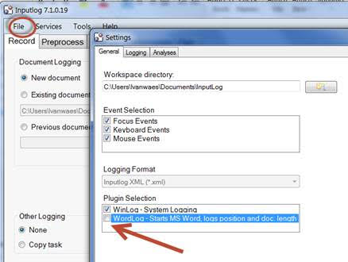
Changing Recording Settings
- Select File in the top menu.
- Options: Change Plugin Selection by unchecking the WordLog option.
Merging Log Files
To merge the inputlog.idfx file into the Translog-II *.xml file, run the following command: